NHS App technical specification
This document gives a technical overview of the NHS App, including how it is built, the main services it supports, and how it connects with NHS and third-party systems. It explains the app’s architecture, key user journeys, integration patterns, and deployment approach. You can use it to understand how the NHS App works at a technical level and how its services are delivered.
1 Introduction
1.1 Purpose of the document
This document summarises the Architecture for the NHS App Programme. Its purpose is to explain how the NHS App is constructed, illustrate the integrations with NHS and third-party systems, and describe the main features and user journeys.
The NHS App is one of the National Digital Channels (NDC) providing citizen access to 'public facing digital health' services. The NHS App focuses on integrating digital health and care services into a single, easy to use and standardised channel, to improve the user experience and to empower patients to take more control of their health and care.
The NHS App is a mobile and tablet application, available for download from both the Apple App Store and Google Play Store. It provides a simple and secure way to access a range of face to face and digital NHS services and advice, as well as access to third-party digital tools.
Users can also access NHS App services from the browser on their desktop or laptop computer as well as using a web browser on a mobile phone or tablet1.
The NHS App’s coherence with NHS login requires an uplift to the same commission in place for NHS login, as such, the NHS legal direction has been updated to reflect a commission from the Department of Health and Social Care (DHSC). The NHS App will submit supplier integration approvals via the relevant approval boards to meet the continued criteria required to provide the NHS App service.*
The document will be refreshed as the solutions and architecture evolves.
* Some features available on the mobile App may not be available via desktop.
1.2 Audience
The primary audiences for this document are:
- NHS App team
- Senior leadership in NHS England (NHSE)
- NHS England
- Department of Health and Social Care
- NHS App Governance boards (as relevant)
2 System context
The system context represents the NHS App as a single object (in the centre of the diagram below) and identifies the interfaces between the system and external entities. This representation defines the system and identifies the information and control flows that cross the system boundary.
The system context highlights several important characteristics of the system: users, external systems, batch inputs and outputs, and external devices.
External events to which the system must respond.
Events that the system generates that affect external entities.
Data that the system receives from the outside world and that must be processed in some way.
Data produced by the system and sent to the outside world.
There are 2 main integration styles adopted by the NHS App:
Web integrations - where the NHS App directs a user to another NHS or third-party website. Many of these include single sign-on with NHS login, which means that the user does not need to re-authenticate to continue their journey.
Application Programming Interface (API) integrations - where the NHS App accesses data in another NHS or third-party system and displays the data within the NHS App. This approach provides a more coherent user experience.
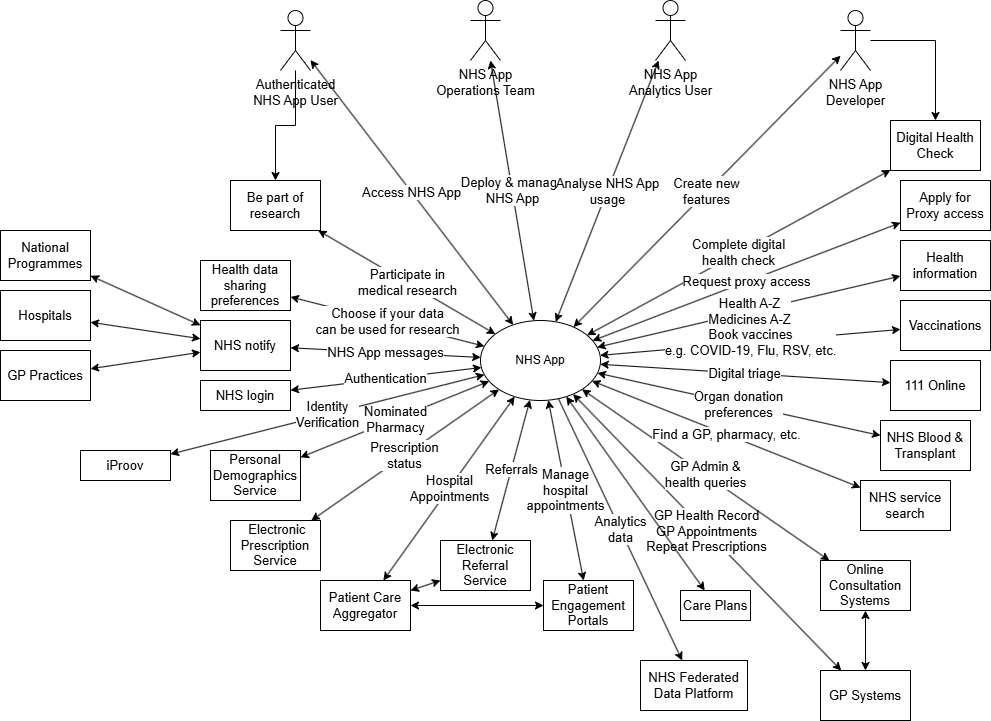
Interaction table
| Actor | Label/name | Interactions | Integration style |
|---|---|---|---|
| Users | Authenticated NHS App user | Access NHS App | N/A |
| NHS App Operations team | Deploy and manage NHS App | N/A | |
| NHS App Analytics user | Analyse NHS App usage | N/A | |
| NHS App developer | Create new features | N/A | |
| Supporting services | NHS login | User Authentication | Web and API |
| iProov | Photo ID verification | API | |
| Personal Demographics Service (PDS) | Retrieve and change nominated pharmacy | API | |
| Patient Care Aggregator | Manage hospital appointments | API | |
| Patient engagement portals | Manage hospital appointments | Web | |
| Electronic Referral Service | Choose and book hospital appointments | Web and API | |
| GP systems |
NHS login account uplift to P9 Access GP health record Book and manage GP appointments Order repeat prescriptions |
API | |
| NHS Blood and Transplant | Set organ donation preferences | API | |
| Online consultation systems | GP admin and health queries | Web | |
| Electronic Prescription Service | Retrieve prescription status | API | |
| Be part of research | Volunteer to participate in health research | Web | |
| Health data sharing preferences | Choose if your data can be used for research | Web | |
| NHS Service Search | Find a GP, pharmacy | Web | |
| 111 online | Access urgent (not emergency) care | Web | |
| Vaccinations | Book and manage vaccines | Web | |
| Health information | Access information about health conditions and medicines | Web | |
| NHS Notify | Receive notifications and messages from NHS and third-party services | API | |
| Digital Health Check | Complete NHS health check online (pilot) | Web | |
| Apply for Proxy | Electronic form to request proxy access (pilot) | Web | |
| External data flows | NHS Federated Data Platform (FDP) | NHS App analytics data sent to Federated Data Platform for further analytics and reporting | API |
3 Architecturally significant use cases
This section describes the main tasks that an NHS App user can perform (where available to a user), and how the underlying technology enables the desired outcomes.
3.1 User login
3.1.1 Initial registration
Tasks
If a user does not have an NHS login account, then when they first launch the NHS App, they will need to create one. NHS login has three levels of identity proofing: p0, p5 and p9. Users can only access NHS App with a p5 or p9 account.
Integrations
NHS login – for user authentication.
iProov to validate the user’s identity documentation (Passport or Driver’s license) and to perform a liveness check.
IM1 API integration to validate GP linkage key details. See details on our website.
P0 means No Identity proofing, which maps to 'Verification – Low' within DCB3051.
P5 means Knowledge-based verification ONLY, which maps to 'Verification – Medium' within DCB3051.
P9 means Physical comparison, which maps to 'Verification – High' within DCB3051.
3.1.2 User login
Tasks
User logs in to NHS App.
The authentication is handed-off to NHS login using the OAuth protocol. This involves opening the NHS login web application, entering a username and password, and a one-time passcode.
Integrations
NHS login.
3.2 Primary care
This section includes digital interactions between users, their GP practice and nominated pharmacy.
Tasks
User accesses their GP Health Record, which can include the following types of
information:
Allergies and adverse reactions
Medicines
Immunisations
Health conditions
Test results
Consultations and events
Documents
A patient can request Detailed Coded Record access. The date range, information available and level of detail is controlled by the GP.
Integrations
IM1 API integration for GP practices that use EMIS or TPP software GP Connect PFS API integration for GP practices that use Medicus software NHS login integration to pass over the user's credentials to the GP system
software.
3.3.2 Online consultations
Tasks
Online consultations are a way for patients to contact their GP practice without having to queue on the phone or visit the practice in person.
Users can contact their GP practices about a new or ongoing health problem, and also make administrative requests. They can ask questions or tell their GP about their symptoms.
The practice ensures their query is dealt with by the right person in the team, helping ensure everyone is served as quickly and appropriately as possible.
Integrations
Web integrations with Online Consultation (OLC) tools, displayed within the NHS App mobile app.
NHS login integration so that the user's identity is securely handed over to the OLC tool and they do not need to re-authenticate.
3.2.3 GP appointment booking
Tasks
Users can book and cancel GP appointments.
Users can view upcoming and past GP appointments.
This is dependent on which appointments their GP makes available to NHS App users.
Integrations
IM1 API integration for GP practices that use EMIS or TPP software NHS login integration to pass over the user's credentials to the GP system software.
3.2.4 Nominated pharmacy
Tasks
A user can find out which pharmacy their prescriptions will be sent to. They can also change their nominated pharmacy.
Integrations
API integrations to Personal Demographics Service (PDS) and NHS Service Search.
3.2.5 Prescription ordering and tracking
Tasks
A user can:
- request a repeat prescription from their GP
- check on the status of their request
- display a barcode that can be presented at a pharmacy to collect a prescription
Integrations
IM1API integration for GP practices that use EMIS or TPP software - for prescription requests GP Connect PFS API integration for GP practices that use Medicus software API integration with Electronic Prescription Service - to retrieve prescription status and barcode.
3.2.6 Proxy
Tasks
A user can retrieve a list of people who they can access services on behalf of (proxy).
If the user has proxy access for another person, on their behalf they can:
- book a GP appointment
- order a repeat prescription
- view their GP health record
A user can submit a request for proxy access (currently to a limited number of GP practices).
Integrations
IM1API integration for GP practices that use EMIS or TPP software (Future: Validated Relationship Service).
3.3 Secondary care
3.3.1 Appointments
Tasks
When referred to secondary care (for example, to a hospital), a user can:
- choose a health provider
- view waiting times
- book, amend or cancel an appointment
- access relevant resources whilst waiting for care
- view past appointments
- access letters and documents
- answer questionnaires
Integrations
API integration to Patient Care Aggregator.
Web integrations to Electronic Referral Service and Patient Engagement Portals.
3.4 National services
3.4.1 Notifications and messaging
Tasks
A user can receive messages from across the NHS. These can include:
- appointment reminders (GP and hospital)
- vaccination invitations
- links to surveys, newsletters and invitations to events
If the user has enabled NHS App notifications on their device then they can receive notifications when a new message is received.
Integrations
The NHS App API is used by third-party services to send notifications and messages to NHS App users. This includes those sent through NHS Notify.
3.4.2 111 Online
Tasks
Access 111 online via NHS App.
Integrations
Web integration with 111 online website.
NHS login integration to pass over the user's credentials.
3.4.3 Vaccinations
Tasks
A user can receive a message from a national vaccination campaign and/or from their GP to inform them that they are eligible to book a certain vaccine. This message will typically include a link to a booking website.
A user can access vaccination booking from within the NHS App (currently COVID-19, Flu and RSV - if eligible).
A user can access their COVID-19 vaccine record.
Integrations
Authenticated Web integrations to the Vaccine web applications.
Messages sent to user via the NHS App API.
3.4.4 Organ donation preferences
Tasks
A user can make or check their organ donation decision.
Integrations
API integration with NHS Blood and Transplant Organ Donation API.
3.4.5 Access health information
Tasks
A user can access health and medicines information provided by the NHS.
Integrations
Web integrations to websites including Health information.
As these are public websites, NHS login integration is not required.
3.4.6 Service search
Tasks
A user can find NHS services based on location.
Integration
Web integration to our website. As this is a public website, NHS login integration is not required.
3.4.7 Health data sharing
Tasks
Users can view or change their National Data Opt-Out choice at any time and to decide whether their confidential patient information can be used for research and planning.
Integrations
Web integration to our website.
3.4.8 Be part of research
Tasks
Users can register their interest in participating in health research.
Integrations
Web integration to NIHR website. NHS login integration to pass over the user's credentials.
3.5 Analytics
Tasks
NHS App team members and external stakeholders make use of the analytics data that is captured and anonymised to make decisions about the NHS App and healthcare provision.
Integrations
The primary analytics service is within the NHS App system boundary. Data is also transferred to the NHS Federated Data Platform.
4 NHS App integration patterns
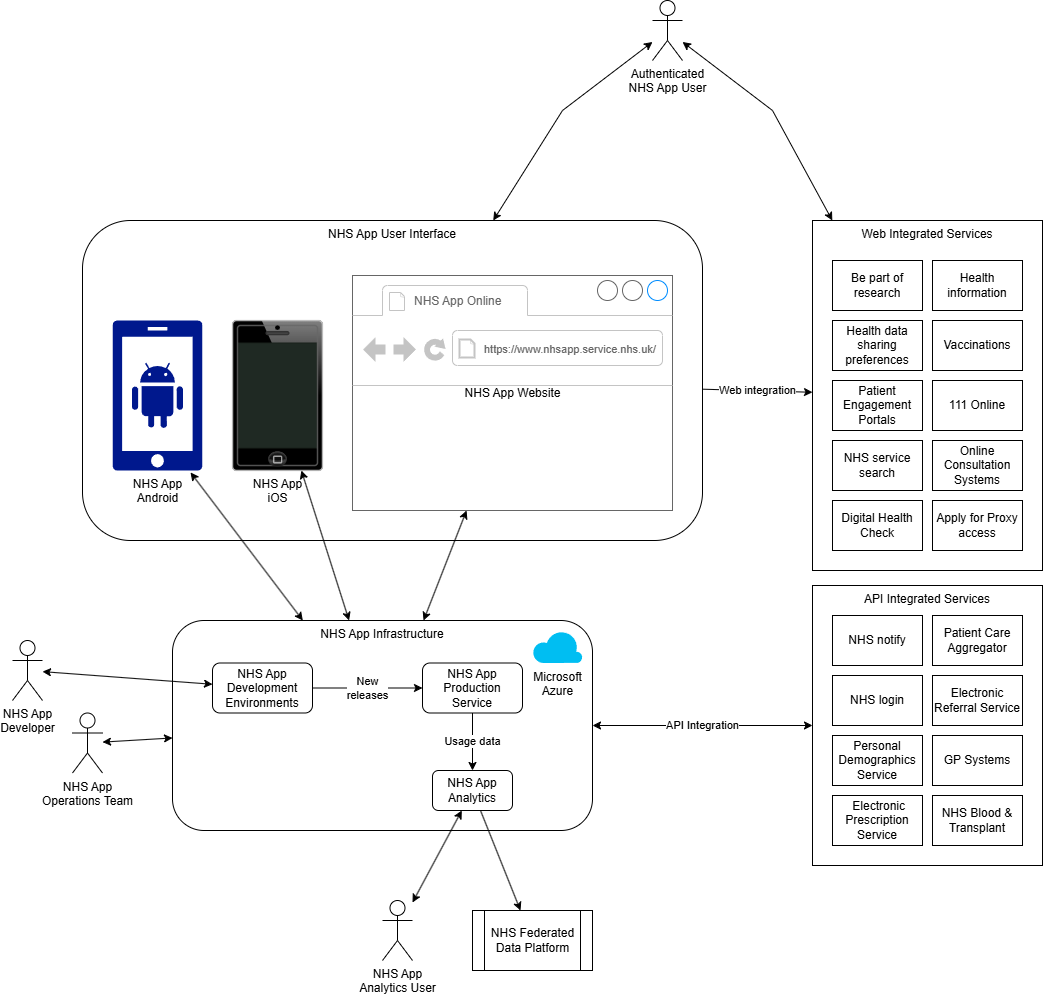
The NHS App delivers many of its services to users through integrated services. These services are listed in the System context and Architecture overview sections of this document.
There are 3 different integration patterns employed by the NHS App, described in the table below.
| Integration pattern | API-based | Responsive web | Link out |
|---|---|---|---|
| Description | The NHS App accesses data in the external system using an Application Programming Interface (API). The user interface is within the NHS App. |
The NHS App accesses an external web application and displays it within the NHS App mobile app. (For web browser users, a new tab is opened.) Many of these integrations hand over the user's NHS login credentials so that the user does not need to log in again to access their data. The owners of these web application confirm to the NHS design system - that is, the look and feel - to provide a coherent user experience. |
The NHS App opens an external web application in a new web browser window. |
| Examples | GP systems | 111 Online | Health data sharing preferences |
| NHS Blood and Transplant - organ donation preferences | Patient engagement portals | Health data sharing preferences |
4.1 API management
Many of the APIs that the NHS integrates with are accessed through the NHS API management platform. This provides a consistent integration mechanism along with integration with NHS login for authentication.
5 Architecture overview
The architecture overview describes at a high level how the system meets the requirements.
6 Deployment
6.1 iOS and Android mobile apps
The NHS App native iOS and Android apps follow a hybrid app approach. The native app consumes web applications, including the NHS App web presentation layer, which is also accessible using a web browser on a mobile phone, tablet or computer. Most business logic is provided within the NHS App web layer, with the native application providing interfaces to:
- device biometrics (login without a password)
- device notifications
- file storage
- calendar integration
- camera (for initial registration)
6.2 NHS App service
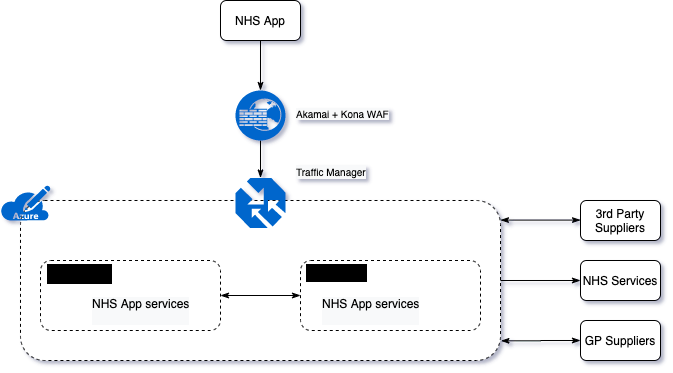
The NHS App service is deployed on Microsoft Azure Cloud across 2 UK regions [redacted]. Much of the NHS App is deployed on the Azure Kubernetes Service (AKS), and other elements use Azure Serverless features. These services provide high levels of availability and resilience along with the ability to automatically add capacity when workload increases and remove capacity when the demand decreases.
7 Change control - governance process
NHS England will manage any changes to this specification through the Information Governance Documents Approvals process.
Last edited: 2 July 2026 4:23 pm