Get started with Apply for Care ID
Guidance materials on how to start using Apply for Care ID.
What you need to start using Apply for Care ID
1. You'll need a link to the service - https://apply-for-care-identity.care-identity-service2.nhs.uk/authenticate
2. Registration Authority (RA) managers or agents, and sponsors will need an authenticator (such as Windows Hello, a passkey or a smartcard) with one of these roles assigned:
- R5080: Registration Authority manager
- R5090: Registration Authority agent
- B0267: Registration Authority ID checker
- B1300: Sponsor
3. You'll need to provide the applicant's:
- name
- email address - NHS.net or another email domain on the Care Identity Service allow list, including Gmail, Yahoo, Hotmail, Outlook and iCloud
- mobile phone number
Use Apply for Care ID
Getting help with Apply for Care ID
View our support pages for help with:
Using Apply for Care ID for onboarding large groups
Apply for Care ID allows RAs to invite large groups to take photos of their own documents. These are then verified by a central team of NHS ID checkers. If approved, this automatically creates a Care ID in Care Identity Management (CIM).
You can use this for issuing large numbers of smartcards or other authenticators for students.
If you want to discuss student onboarding using Apply for Care ID, contact [email protected]
How Apply for Care ID fits with other ID verification processes
ESR and Apply for Care ID
If your organisation can create Care IDs through ESR, Apply for Care ID may not provide as much benefit as it does for organisations where this is not the case.
Apply for Care ID does not integrate with ESR and can be seen as a different way of verifying a new staff member’s identity in a robust way, and automatically creating a Care ID in CIM.
Where organisations do use ESR to create Care IDs in CIM, there are sometimes other use cases where ‘Apply for Care ID’ might be used, for example with onboarding large groups of applicants.
HR onboarding and Apply for Care ID
We are aware that there is some duplication of effort between checking an individual’s identity during the recruitment process and then verifying their identity to issue them with an authenticator.
We are focused on refining and developing the technology for Apply for Care ID, but we're considering how in the future this service might be used to reduce duplication between HR onboarding and issuing authenticators.
We do not have current plans to integrate with software such as Trac. The focus of our project is to verify identities to create Care IDs for staff that need access to national clinical technology services.
Information about our privacy policy and Data Protection Impact Assessments (DPIA)
We have published information about how we handle data in the approved authentication tokens privacy policy for Care Identity Service users.
Case study
Apply for Care ID in universities
During our Apply for Care ID pilot with universities, we successfully issued smartcards to over 700 students without the need for a face-to-face meeting with an RA.
Our case study explains more about our pilot and how the service benefits RAs, students and student support teams.
Identity Assurance Level uplift
'Unverified' Care IDs can now be uplifted to 'Verified' Care IDs, allowing users to access all systems and services.
We've added new radio buttons to choose whether or not you wish to uplift an existing CIM user's Identity Assurance Level.
This allows an RA to increase the level of access for a user who has previously registered via the self-service process, but who now needs to access a service requiring a smartcard or other authenticator, such as NCRS.
Choosing 'Uplift Existing Account' will cause a new field to appear, 'CIM user ID'. This is the user's 12-digit ID number, also known as their UUID.
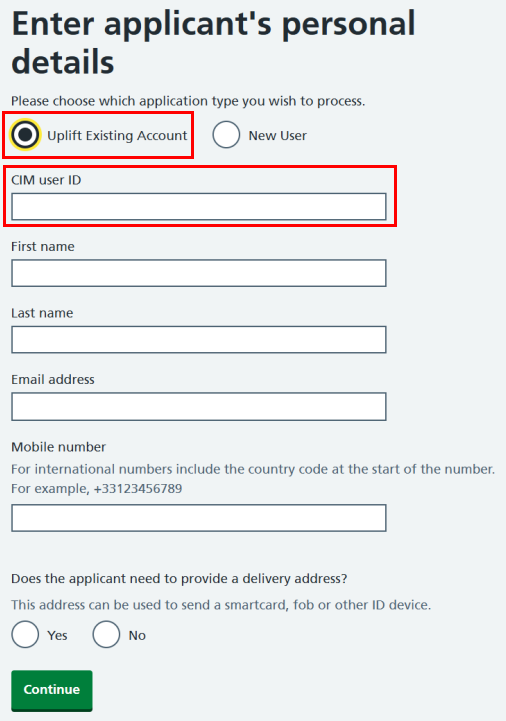
Note that all fields are mandatory when uplifting a user's Care ID.
Last edited: 21 August 2026 9:58 am