Death notification event
The Death notification event notifies subscribers when a patient's death status in the Personal Demographics Service (PDS) has been updated.
Overview
The Death notification event notifies subscribers when a patient's death status in the Personal Demographics Service (PDS) has been updated.
This event follows a notification and retrieval pattern. It does not include the updated patient data. Instead, it signals that a change has occurred so that your system can retrieve the latest version of the patient record from PDS.
This approach ensures that PDS remains the source of truth for patient demographics:
-
publisher: Personal Demographics Service (PDS)
-
event name: pds-death-notification-2
-
delivery mechanism: Multicast Notification Service (MNS)
-
payload type: Notification (signal only)
-
data retrieval: Requires a follow-up call to PDS, which should be the PDS FHIR API for new services onboarding, otherwise older systems may use their existing legacy messaging.
For general guidance on using MNS, refer to the MNS service page.
Event status
This event is in production.
When should I use this event?
Use this event if your system:
-
stores local copies of patient demographic data
-
needs to stay aligned with PDS updates
-
can retrieve updated data from PDS when notified
Example use cases
-
Any system that has a data retention policy after a patients death and needs to be notified to start that process
-
A booking system that has a need to cancel future bookings for a deceased patient
Note: Please note that this event is updating you that the death status has been updated, this could be to true or false, so a call to PDS is always required after receiving this event.
How this event works
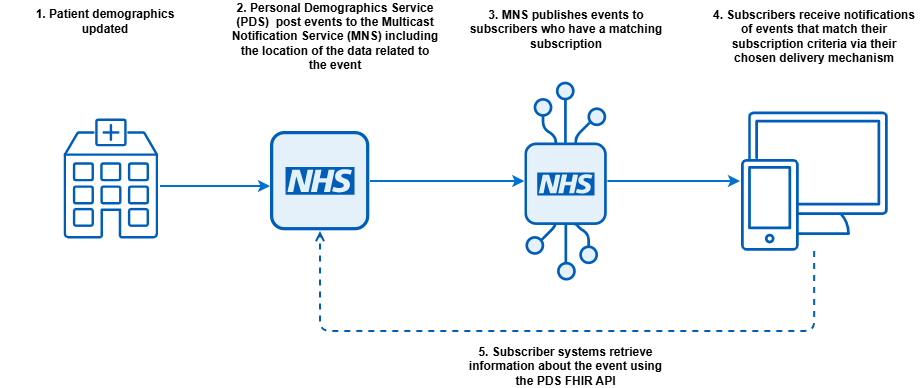
This event follows a notification and retrieval pattern:
-
A patients death status is updated in PDS.
-
A change event is published.
-
The event is delivered to a subscribed system via MNS.
-
Your system receives the event.
-
Your system retrieves the latest patient record using the NHS number.
-
Your system applies the latest data.
Event structure
This event is available in both FHIR and CloudEvents formats.
- FHIR events are accessible to both internal and external subscribers.
- CloudEvents format can be accessed by internal subscribers only.
| CloudEvents | FHIR | Type | Mandatory | Cardinality | Description |
|---|---|---|---|---|---|
| specversion | n/a |
String |
M |
1..1 |
Indicates this is a version 1 CloudEvent. Always"1.0" |
| id | id | GUID | M |
1..1 |
GUID - for this event |
| source |
source |
URI |
M |
1..1 |
The publisher of the event. Not the original service which triggered the change |
| type |
event-type |
String |
M |
1..1 |
name of the event, will always be pds-record-change-2 |
| time |
timestamp |
Timestamp | M |
1..1 |
Time of the event ISO 8601 |
| subject |
subject |
String |
M |
1..1 |
NHS number of the patient |
| versionid |
version-id |
String |
M |
1..1 |
The NHS Digital assigned version of the patient resource. This is the meta.versionId attribute in a patient resource body in the PDS FHIR API. It may also be referred to as the Serial Change Number (SCN) in older documentation. |
CloudEvent example
{
	"id": "b01dd3dd-c8c1-486b-b881-fa87bbe5da44",
	"source": "https://fhir.nhs.uk/Id/nhsSpineASID/477121000323",
	"type": "pds-death-notification-2",
	"time": "2022-04-05T17:32:00.000Z",
	"dataref": "https://internal-dev.api.service.nhs.uk/personal-demographics/FHIR/R4/Patient/9435810624",
	"specversion": "1.0",
	"subject": "9435810624"
}
Example FHIR event
{
	"resourceType": "Bundle",
	"id": "b01dd3dd-c8c1-486b-b881-fa87bbe5da44",
	"type": "history",
	"timestamp": "2022-04-05T17:32:00.000Z",
	"entry": [
		{
			"fullUrl": "urn:uuid:58eb964f-1806-41de-a05b-e2929e741954",
			"resource": {
				"resourceType": "Parameters",
				"meta": {
					"profile": [
						"http://hl7.org/fhir/uv/subscriptions-backport/StructureDefinition/backport-subscription-status-r4"
					]
				},
				"id": "58eb964f-1806-41de-a05b-e2929e741954",
				"parameter": [
					{
						"name": "subscription",
						"valueReference": {
							"reference": "https://api.service.nhs.uk/multicast-notification-service/subscriptions"
						}
					},
					{
						"name": "status",
						"valueCode": "active"
					},
					{
						"name": "type",
						"valueCode": "event-notification"
					},
					{
						"name": "notification-event",
						"part": [
							{
								"name": "event-number",
								"valueString": "1"
							},
							{
								"name": "timestamp",
								"valueInstant": "2022-04-05T17:32:00.000Z"
							},
							{
								"name": "focus",
								"valueReference": {
									"reference": "https://internal-dev.api.service.nhs.uk/personal-demographics/FHIR/R4/Patient/9435810624"
								}
							}
						]
					},
					{
						"name": "additional-context",
						"part": [
							{
								"name": "event-type",
								"valueString": "pds-death-notification-2"
							},
							{
								"name": "source",
								"valueUri": "https://fhir.nhs.uk/Id/nhsSpineASID/477121000323"
							},
							{
								"name": "subject",
								"valueReference": {
									"identifier": {
										"value": "9435810624"
									}
								}
							}
						]
					}
				]
			},
			"request": {
				"method": "GET",
				"url": "https://api.service.nhs.uk/multicast-notification-service/subscriptions"
			},
			"response": {
				"status": "200"
			}
		}
	]
}
Subscription filters
You can normally filter the events you want to receive using the criteria field in the subscription payload.
The expected use case for this event is that you subscribe to all events and discard the ones for patients you have no relationship with. Events that are not stored should not be actioned or even logged.
Subscription examples
The following examples contain the criteria string that forms part of the subscription. This event was designed so that systems will subscribe to all events of this type, and discard the ones relating to patients they have a no relationship with.
Receive all death events
eventType='pds-death-notification-2'
Onboarding
To subscribe to this event, you will need to:
- complete onboarding to PDS FHIR API (if data retrieval is required)
- complete onboarding for MNS
-
use the Subscription API to create a subscription
-
configure an endpoint to receive event notifications
Refer to Subscribe to Multicast Notification Service for further guidance.
Versioning
- pds-death-notification-2 is the current version of this event
- FHIR R4
- CloudEvent
- pds-death-notification-1 has been deprecated and replaced with this event
Testing
These events are available in the Path to Live environments (PTL). To test receiving an event, you will need to initiate a change to a demographics record in your test pack that you received when you onboarded to demographics in PTL.
Last edited: 15 October 2026 12:13 pm